 Next-Generation Browser Extension for Enhanced Security,
Deployed with a Simple Add-On
SecureLayer Browser Extension
Deployed with a Simple Add-On
Solving Today’s Network Usage Challenges
The use of Software as a Service (SaaS) is rapidly escalating due to factors such as accelerated digitalization, the imperative for cost reduction and the widespread adoption of remote work. While SaaS offers accessibility from any location with an internet connection, it simultaneously introduces various security risks, including unauthorized access due to leaked IDs/ Passwords, malware infection, and data leakage from sensitive information uploads. The SecureLayer Browser Extension resolves these critical issues for network administrators.
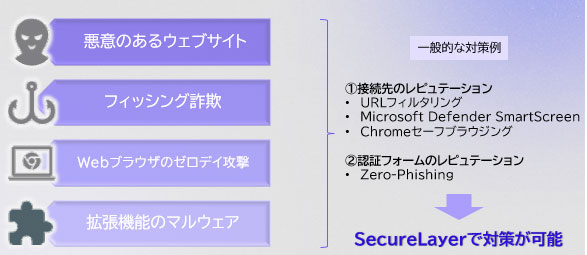
- Preventing Malware Infection from Malicious Site Access
The solution analyzes phishing and malware sites, initiating session termination or component incapacitation upon detection. Furthermore, the browser is maintained in secure state through the disabling of risky browser extensions and continuous version checks.
-
Shadow IT Identification (SaaS Visibility)
SecureLayer Browser Extension monitors the SaaS services used by employees and detects unauthorized or unmanaged SaaS applications. It also provides visibility into the SaaS applications and cloud storage services employees use, enabling administrators to understand their usage status. High-risk SaaS applications and cloud storage services can also be listed and blocked from access.
-
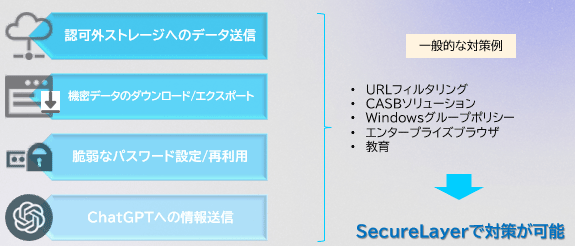
Controlling Policy-Violating User Actions (Confidential Data Leakage)
SecureLayer Browser Extension prevents confidential data from being leaked through the browser by blocking actions such as attaching files to cloud storage services or free webmail, and pasting confidential or personal information into ChatGPT or translation websites.
-
Addressing Latency Caused by Browser Isolation or Dedicated Browsers
Because SecureLayer Browser Extension is simply added as a plugin to familiar browsers such as Chrome and Edge, it:
- Provides a safe browsing environment without degrading user experience
- Avoids the need to redesign the entire network architecture, as would be required with VDI or similar technologies
How the SecureLayer Browser Extension Platform Works
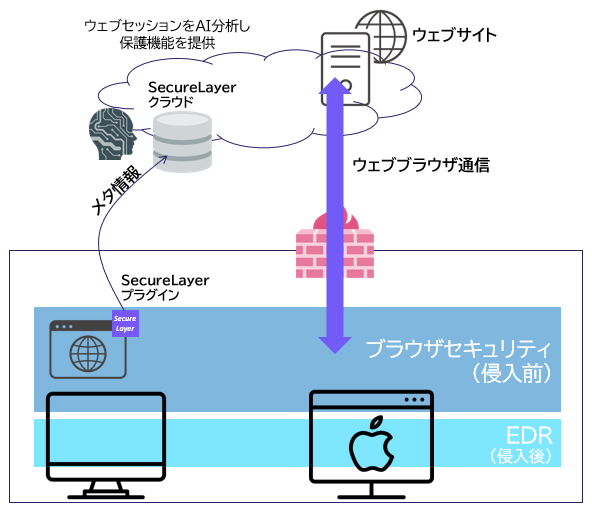 SecureLayer Browser Extension is a next-generation browser extension that transforms a conventional browser into a security-enabled browser simply by adding it as an extension. The SecureLayer plug-in analyzes the components of received web pages and sends metadata to the SecureLayer cloud for AI-based analysis. This enables suspicious code on websites, such as exploit code and malware, to be disabled in real time, while also blocking user actions that could lead to security incidents, such as the use of unauthorized SaaS applications or pasting confidential or personal information into translation sites and other online services. It can also help address concerns about information leakage through ChatGPT by controlling access to ChatGPT on a per-user or per-group basis and blocking the entry of confidential information.
- Browser Receives Web page: The conventional browser initiates the receipt of the web page content.
- SecureLayer Browser Extension analyzes the components of the loaded web page.
- Metadata Transmission to Cloud: The analyzed content is transmitted as Metadata to the SecureLayer cloud.
- Suspicious component Detection: AI and other analytical processes in the cloud detect components exhibiting suspicious behavior.
- Mitigation Execution: The SecureLayer Browser Extension executes the necessary mitigation actions, such as session termination or component incapacitation.
Security Products
- Next-Generation Firewall
- Targeted Attack Protection
- Cloud Security / Virtualization
- Mobile / Endpoint Security
- Email Security
- Anti-Phishing
(BEC etc.) - Application Security
- Server Security
- Sandbox
- File Sanitization
- Log Analysis
- Server Monitoring
- Encryption
- Security Policy
- Industrial Control System Security
- Connected Car Security
- WAAP
- Browser Security
- Cloud Backup
- SASE
- ASM
- Vulnerability Management
- Security for AI