 Agentless Server Monitoring Tool for Real-Time Network, Application, and Performance Monitoring
SiteScope
Agentless Server Monitoring Tool for Real-Time Network, Application, and Performance Monitoring
SiteScope
Key Features of SiteScope
-
Efficient Monitoring with Agentless Technology
Traditional server monitoring tools require agents to be installed on each monitored server. However, installing agents introduces issues such as:
1. The need to manage agent versions, perform upgrades, and make configuration changes
2. Potential impact on servers due to agent load or malfunctions
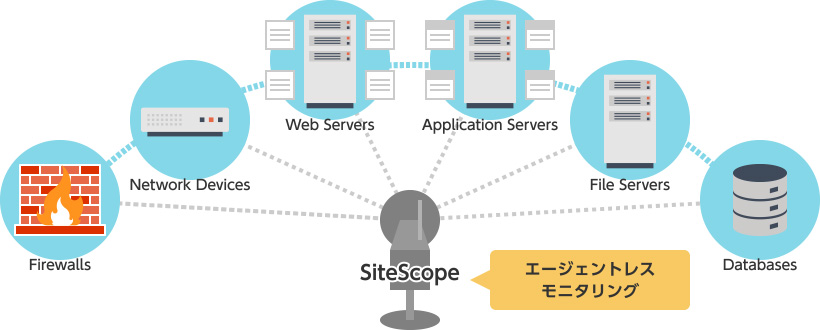
SiteScope provides agentless monitoring without requiring agents to be installed on the servers being monitored. This eliminates concerns about agents affecting monitored systems and makes management easier.
-
Simple Setup and Over 80 Monitoring Capabilities
Because SiteScope does not require agents, only the SiteScope Manager needs to be installed, significantly reducing the time required for deployment.
A wide range of preconfigured monitor templates is also available, allowing monitoring to begin quickly without spending significant time on configuration.
SiteScope provides a wide variety of monitors, including server monitors for measuring server and operating system characteristics; network monitors for checking network connectivity and testing application performance over the network; URL Sequence Monitors; Stream Monitors; database monitors for testing database performance and collecting performance information; application monitors that collect performance information using the performance measurement capabilities provided by individual applications; and generic monitors, such as log file monitoring and script execution, for supporting a wide range of environments.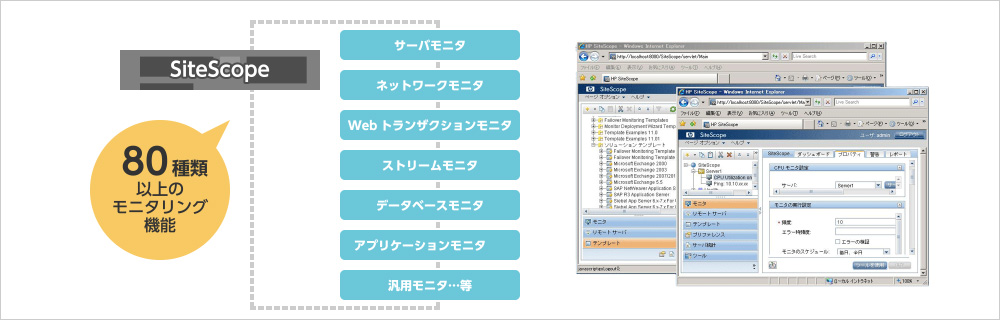
-
Monitoring in Virtualized Environments
SiteScope supports monitoring not only host-based environments but also bare-metal hypervisors such as VMware ESX.
- As long as the monitoring requirements are met, SiteScope can monitor systems regardless of platform.
- For bare-metal hypervisors, monitoring can be considered in terms of the management OS.
For example, monitoring Hyper-V is essentially the same as monitoring a Windows Server environment. - Overall resources are monitored through the management OS, while each guest OS is monitored individually.
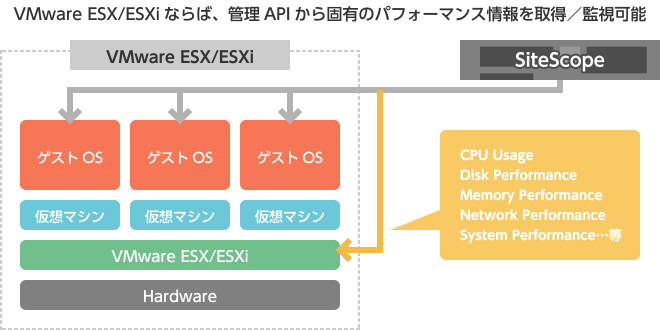
- For VMware ESX/ESXi, SiteScope obtains hypervisor-specific performance information through the management API and uses it for monitoring.
-
Simplified APM for Web Systems
The URL Sequence Monitor, one of SiteScope’s monitoring capabilities, monitors websites from the user’s perspective. For example, it can simulate an entire scenario on an e-commerce website—from accessing the site and adding items to a shopping cart to entering customer and credit card information and leaving the site—to verify that the sequence is functioning correctly. By performing real-time monitoring at regular intervals, problems can be detected and corrected before users report service failures.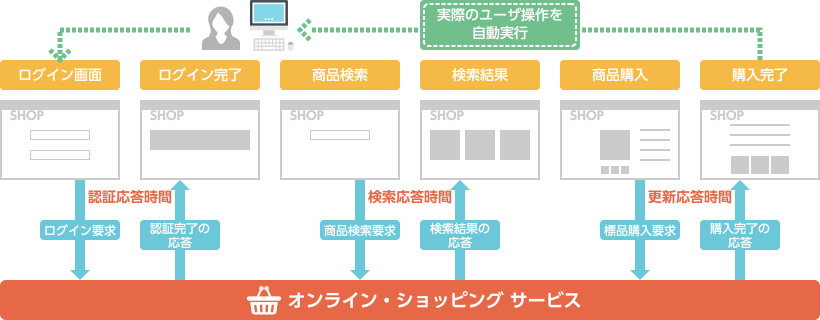
System Requirements
| Operating System | [64-bit environment] |
Windows Server 2012 (Standard Edition, Datacenter Edition) Windows Server 2012 R2 (Standard Edition, Datacenter Edition) Windows Server 2016 (Standard Edition, Datacenter Edition) (dual-core or higher) Windows Server 2019 (dual-core or higher) Windows Server 2022 (Standard Edition, Datacenter Edition) (dual-core or higher) Windows Server 2025 (Standard Edition) Red Hat ES/AS Linux, Red Hat Enterprise Linux 5.5-5.8, 6.0-6.8, 7.0-7.9, 8.x, 9.1-9.6, 10 SUSE Linux Enterprise Server (SLES) 12 SP3, 12 SP4, 15 SP5 Oracle Enterprise Linux 6.0-6.9, 7.x, 8.x CentOS 6.2, 7.0-7.9, 8.x openSUSE 42.2, 42.3
* Web Script Monitor is not supported.
|
|
|---|---|---|---|
| [Virtual environment] |
The operating systems listed above are supported for SiteScope installation when running on VMware, Hyper-V, Amazon Web Services (AWS), or Azure.
* For AWS and Azure, a fixed public IP address is required to install the SiteScope license. |
||
| CPU | 2000 MHz or higher, 6 cores or more | ||
| Memory | 12 GB or more (SiteScope heap: 6 GB or more) | ||
| Disk Space | 150 GB or more of free disk space | ||
| GUI |
LocalClient tool (SiteScope UI display tool) Microsoft Windows Windows Server 2025, 2022, 2019, 2016, 2012 (Standard and Datacenter Editions) Windows 11, 10, 7 macOS macOS Catalina 10.15.7 |
||
(On the manufacturer's documentation page, you can select the version you want to check from "Version" in the upper-left corner. Please note that versions not yet supported by Asgent are also included.)
Deployment Patterns
Deployment Pattern 1: Instance-based Monitoring
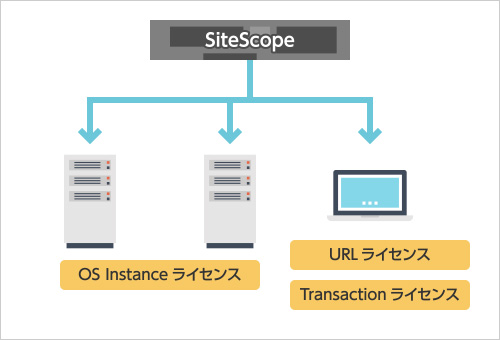
SiteScope supports instance-based monitoring.
Available in version 11.30 and later.
■OS Instance License:
Licenses are assigned on a per-host basis.
One OS Instance License is required for each monitored target. An unlimited number of monitors can be configured for that target, except for URL-related monitors, Web Script Monitors, and SNMP Trap Monitors.
- One OS Instance License is consumed for every 10 SNMP Trap Monitors.
- One OS Instance License is consumed for each datastore monitored by VMware Datastore Monitor.
- One OS Instance License is consumed for each monitored Vertica server and monitored node using Vertica JDBC Monitor.
- One OS Instance License is consumed for each monitored server and monitored zone using Solaris Zone Monitor.
■URL License:
URL-related monitors require one URL License for each URL.
A URL License is required for the following monitors:
- URL
- URL Content
- URL List
- URL Sequence
- Web Service
- Link Check
- XML Metrics
Security Products
- Next-Generation Firewall
- Targeted Attack Protection
- Cloud Security / Virtualization
- Mobile / Endpoint Security
- Email Security
- Anti-Phishing
(BEC etc.) - Application Security
- Server Security
- Sandbox
- File Sanitization
- Log Analysis
- Server Monitoring
- Encryption
- Security Policy
- Industrial Control System Security
- Connected Car Security
- WAAP
- Browser Security
- Cloud Backup
- SASE
- ASM
- Vulnerability Management
- Security for AI