 Integrated Security Solution for Cloud Email, Collaboration Tools, and Storage Services
Check Point
Integrated Security Solution for Cloud Email, Collaboration Tools, and Storage Services
Check Point
Harmony Email & Collaboration
Harmony Email & Collaboration
Check Point Harmony Email & Collaboration is a security solution that provides API-based protection for cloud email services, collaboration tools, and storage services. It leverages Check Point’s extensive threat intelligence database, “Threat Cloud AI,” along with a security engine comprising more than 60 AI-powered mechanisms, to detect phishing emails, suspicious files and malicious URL links, account takeovers, and more with an outstanding catch rate.
Are You Facing These Email Security Challenges?
- You rely on standard M365 security, but phishing emails still reach inboxes.
- You are sometimes unsure whether it is safe to click links in emails
- Your existing system cannot inspect password-protected attachments
- You are worried about becoming a victim of Business Email Compromise (BEC)
- It is difficult to determine whether quarantined emails are real threats or false positives
-
Unrivaled Detection Mechanism: Threat Cloud and Ove 60 Scanning Engines
The architecture of Harmony Email & Collaboration is powered by immense threat intelligence database, “Threat Cloud,” and a security engine that incorporates over 60 AI-powered mechanisms. Specifically, Threat Cloud is composed of big data that aggregates detection events from millions of real user gateways and endpoints deployed worldwide, and around 650,000 malicious domain indicators collected per day using Machine Learning (ML) developed by Check Point Research (CPR), Check Point’s research division. Detected events are shared with other products within 2 seconds, forming a powerful ecosystem. The real-time threat detection map in Threat Cloud can be viewed at:
https://threatmap.checkpoint.com/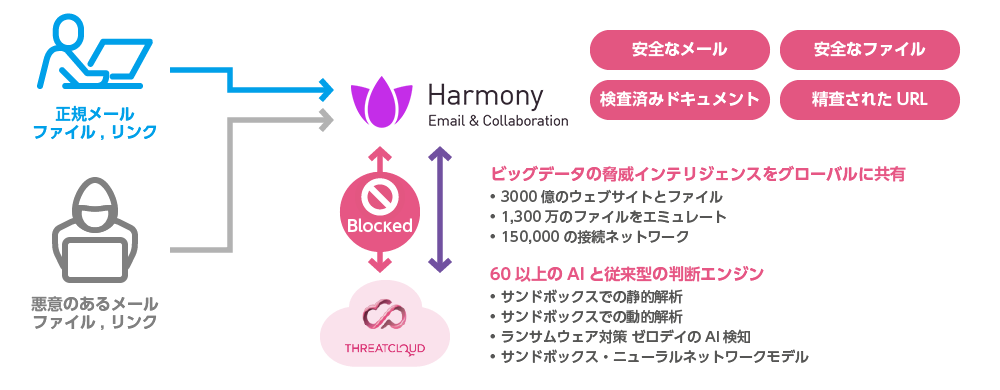
-
No MX Record Changes Required: New Email Security via” Patented Inline API”
Traditional gateway-based email security commonly employs the MTA deployment method, which requires the modification of MX records due to changes in the network routing path. Harmony Email & Collaboration email security, however, performs inspection via API integration, thus eliminating the need for MX record changes.
Furthermore, unlike conventional API-based email security that checks messages after they reach the mailbox, Harmony uses a patented “inline API” to inspect emails before the email arrives in the mailbox, enabling pre-emptive blocking of suspicious messages before they can be opened.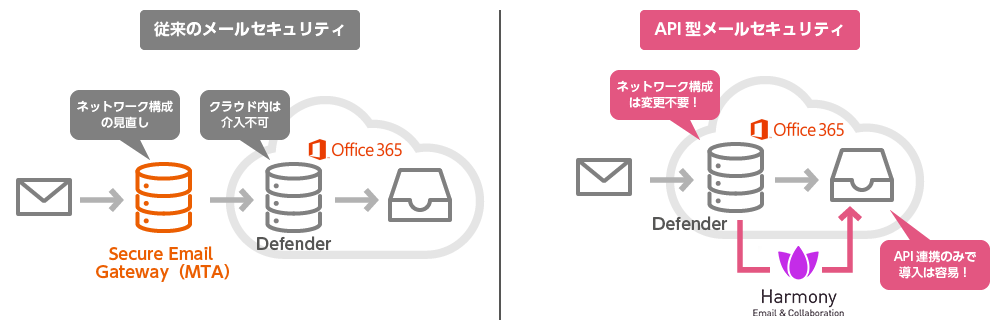
- Inspection of Password-Protected Attachments, Even in Environments Lacking PPAP
While cloud storage and other methods are being adopted as PPAP countermeasures, many organizations still encrypt attachments using password-protected files. When Harmony Email & Collaboration receives a password-protected file, it automatically searches the email body and other fields for the password, extracts the contents and performs malware inspection.
If the password cannot be found, the original file is replaced with a text file indicating the removal of the encrypted file, and a link is generated for file retrieval.
When the recipient enters the password, the decrypted file is scanned; if no threads are detected, the original email is updated so that the decrypted file can be accessed.
Supported file types: Word, Excel, PowerPoint, PDF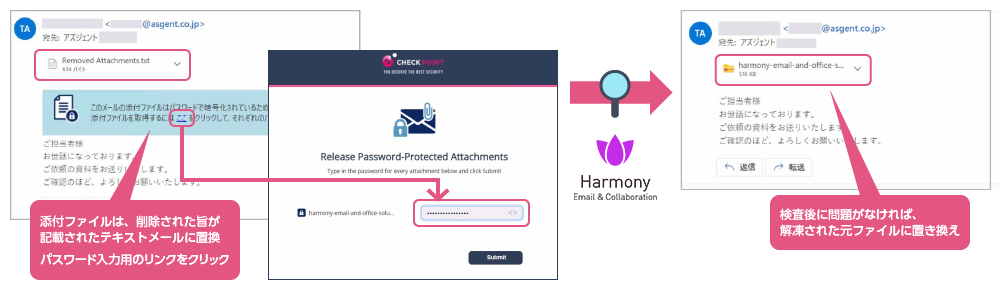
- Secure Both Email and Collaboration Tools
As the name suggests, Harmony Email & Collaboration performs security inspection not only for email, but also for collaboration tools.
Specifically, it comprehensively covers collaboration tools – which are frequently used alongside email – by detects suspicious files and URLs in file sharing services such as OneDrive, SharePoint, and Box, as well as communication tools like Teams and Slack.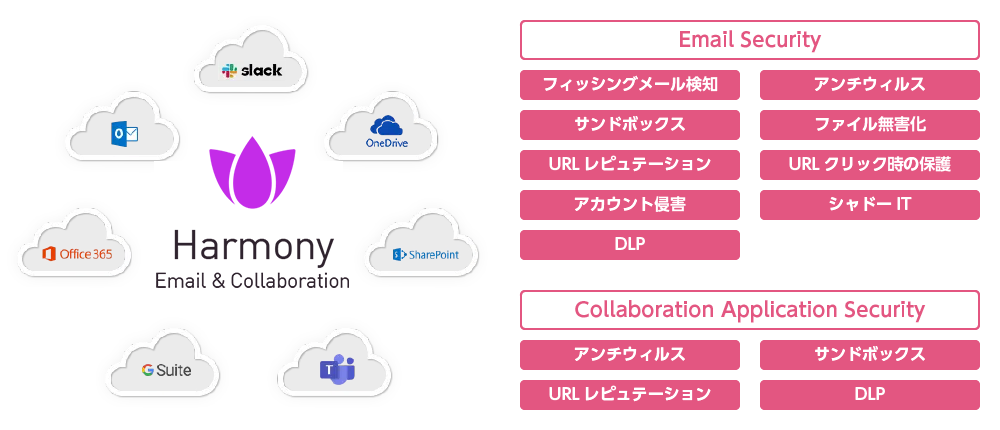
- Highest-Level Phishing Detection Rate and Strong Market Recognition
Harmony Email & Collaboration boasts an extraordinary detection capability: in recent phishing email detection tests, only 10 messages out of 100,000 emails were able to bypass the system.
Furthermore, the product has been recognized as a Leader in Gartner “Magic Quadrant for Email Security Platforms”, demonstrating the high regard it holds from third-party evaluation organizations.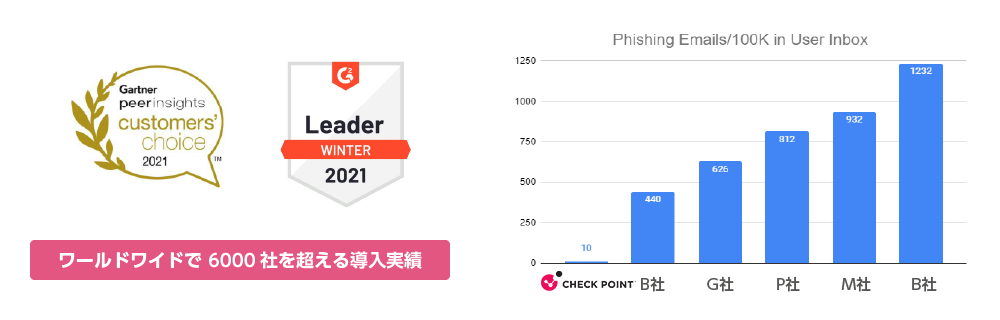
- Deployment in as Little as Five Minutes, Start with a Small-Scale Rollout for Specific Departments
Deployment is simple, requiring only the selection of the SaaS application and the connection of the administrator account. You can be up and running in as little as 5 minutes.
Furthermore, you can start small by applying the licenses to specific departments first, before rolling out to the entire organization.
The “Infinity Portal” management console provides an intuitive way to manage security event statistics, location maps, and attack trends.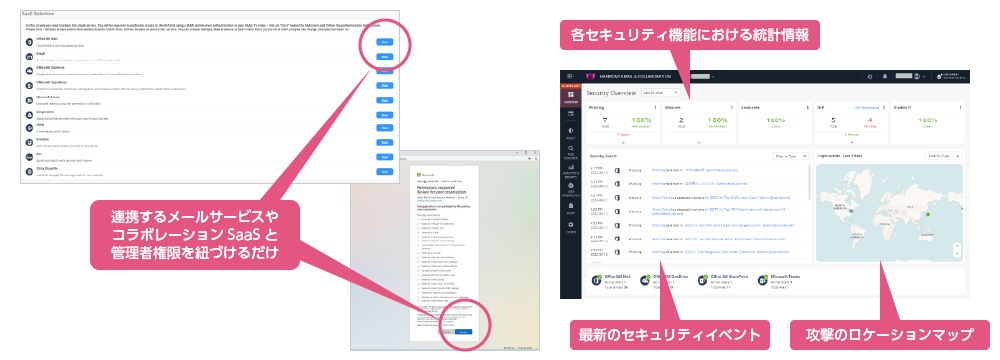
Security Products
- Next-Generation Firewall
- Targeted Attack Protection
- Cloud Security / Virtualization
- Mobile / Endpoint Security
- Email Security
- Anti-Phishing
(Business Email Compromise Protection, etc.) - Application Security
- Server Security
- Sandbox
- File Sanitization
- Log Analysis
- Server Monitoring
- Encryption
- Security Policy
- Industrial Control System Security
- Connected Car Security
- WAAP
- Browser Security
- Cloud Backup
- SASE
- Vulnerability Management