 Prevent information leakage caused by accidental email transmission by encrypting attachments
BRODIAEA safeAttach
Prevent information leakage caused by accidental email transmission by encrypting attachments
BRODIAEA safeAttach
Since the server automatically encrypts attachments, there is no need to install software on client PCs, making it easy to implement measures against misdirected email. Automatic encryption also eliminates human errors such as users “forgetting to encrypt” attachments.
In addition, safeAttach can block email transmission when the number of addresses set in To or Cc exceeds a certain threshold. This feature prevents human errors such as sending bulk email with recipient addresses exposed in To or Cc instead of Bcc, which can lead to email address leaks.
BRODIAEA safeAttach Features
-
Automatically Encrypts Attachments Without User Intervention
Since the server automatically encrypts email attachments, information leakage caused by simple user mistakes, such as forgetting to encrypt, is prevented. In addition, safeAttach automatically generates decryption passwords, eliminating the need for any manual encryption operations or password management, simplifying measures against accidental email transmission.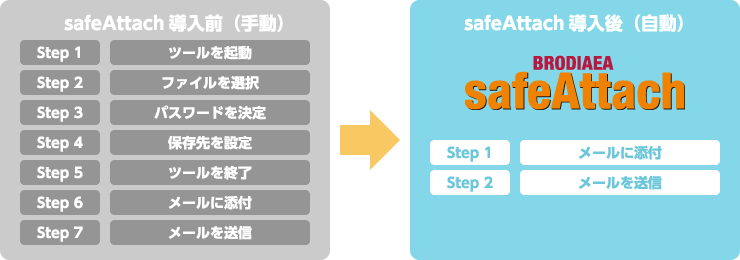
-
User-Friendly Measures Against Accidental Email Transmission
safeAttach uses the ZIP encryption method, so encryption and decryption are possible without installing dedicated software. This enables easy implementation of measures against misdirected email without placing a burden on the recipient’s environment.
It is not dependent on the operating system and can be used in environments such as Windows XP, Mac, and Linux. In addition, misdelivery countermeasures can also be applied in environments where users access email via webmail or groupware-based mailers. -
Attachment-to-URL Conversion
safeAttach can separate the email body from the attachment and allow recipients to download the attachment via the web.
In addition to preventing accidental email transmission, it helps avoid issues such as unintentionally sending very large files as attachments. -
Flexible Password Management and Notification Features
Allows organizations to implement email leakage prevention measures tailored to their internal policies and the recipient environment.
-
Password Management
・Random passwords (one-time passwords)
A decryption password is automatically generated each time an email is sent. You can also restrict the use of easily guessable passwords (company names, phone numbers, etc.). -
・Fixed passwords
Fixed passwords can be preconfigured based on conditions such as recipient domain or sender.
-
Password Notification Methods
・Automatic notification
The decryption password is automatically notified after a specified period of time. Notification can be canceled before it is sent.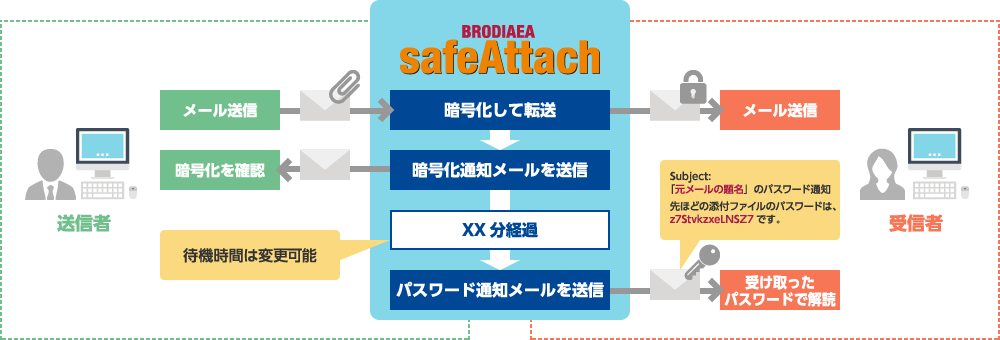
-
・Automatic notification with confirmation
After verification via a web page, the encryption notification email is sent.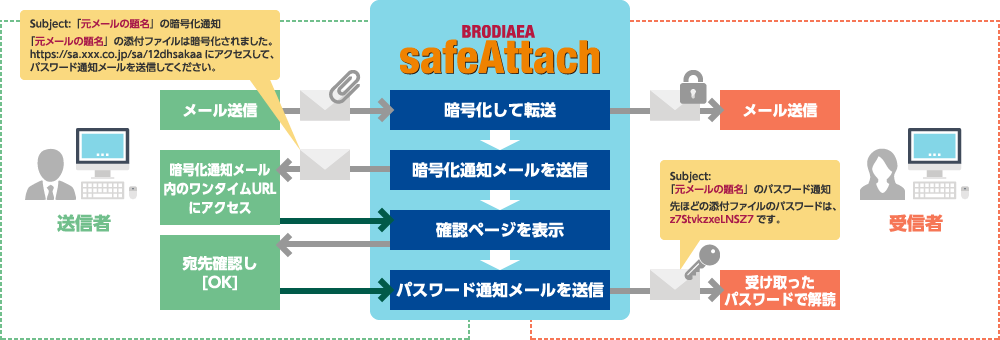
-
Password Management
-
Prevent Misaddressed Emails
safeAttach allows you to implement misdelivery countermeasures that match your organization and recipient environment, helping to prevent emails being sent to the wrong recipient. -
Multilingual Support
Notification emails sent to senders and recipients, file names within encrypted ZIP files, and file names used at download time support multiple languages. In addition, all web screens also support both Japanese and English, making the product suitable for use in overseas environments.
Product Lineup
License fees are not affected by changes in the number of users. An appropriate model can be selected based on email traffic volume.
| Model | safeAttach VM STD | safeAttach VM HX2 |
|---|---|---|
 |
 |
|
| Form factor | Software (VMware-compatible) |
Software (VMware-compatible) |
| Sizing | approx. 12,750 messages/hour (*1) | approx. 38,250 messages/hour (*1) |
(*1) Sizing when only the automatic attachment encryption function is used. When using the hold function, which temporarily retains sent email so that recipients and content can be checked before final transmission, the guideline is approximately 50% of the above sizing.
Deployment Patterns
Deployment Pattern 1: Flexible Policy Configuration
safeAttach prevents information leakage by implementing email misdelivery prevention measures tailored to an organization’s security policies.
Operational examples:
・Emails sent within the organization are not encrypted. ・Fixed passwords are applied to emails sent to specific domains or users
・Automatically encrypt emails whose subject contains specific keywords such as “Confidential”
・Block the sending of emails with attachments whose file extensions are “.doc” or “.xls”
・Block emails to specific domains (such as mobile email domains)
・When the number of recipients specified in the To or Cc exceeds a certain threshold, automatically change them to Bcc (to prevent leaks of email address information)
・Attachments are sent with modified file extensions. (for example: xxx.zip → xxx.zi_)
Deployment Pattern 2: Automatically Encrypt and Send Attachments
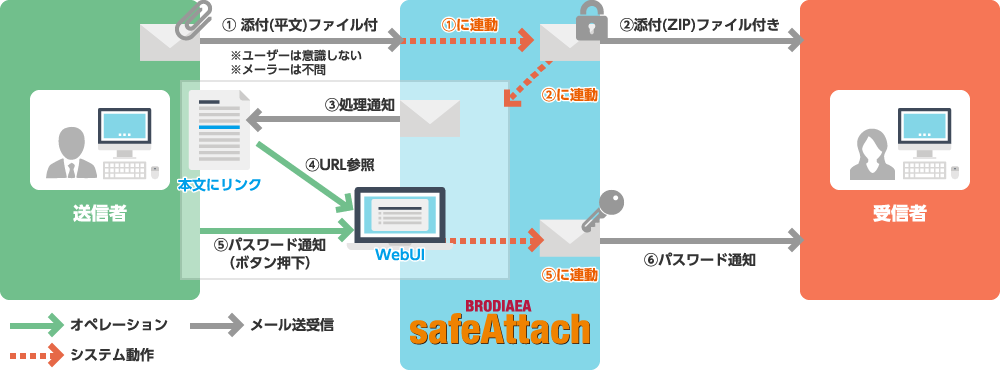
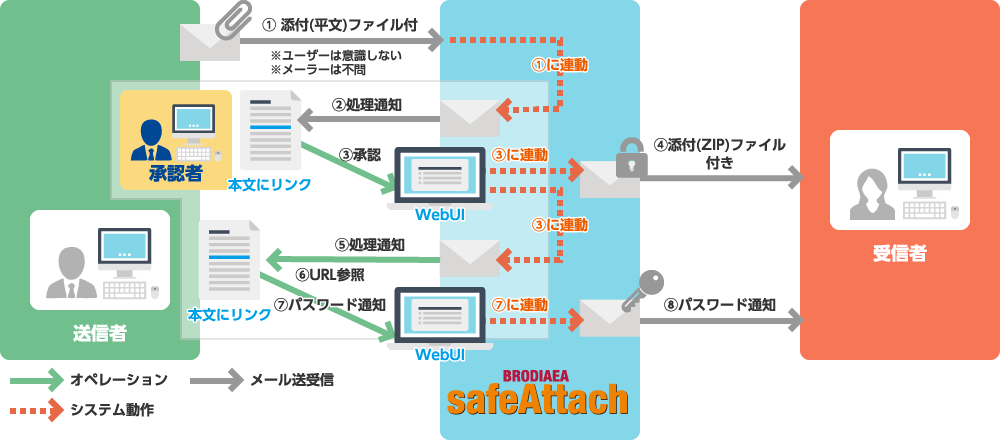
Files attached to emails are automatically encrypted and sent to the recipient. The recipient then receives the password in a separate email sent afterwards. This eliminates issues such as forgetting to encrypt attachments or forgetting to send the password.
Because the password for the attachment is sent only after the sender has confirmed the email content, it is also possible, in the event that an attachment is mistakenly sent to the wrong recipient, to simply avoid sending the password.
Deployment Pattern 3: Having a Third-Party Review Email Content Before Sending
By using the third-party approval function, a supervisor or other designated approver can check the email content and recipients before the email is sent. This not only prevents misdirected email but also allows you to confirm that the email does not contain inappropriate content.
Security Products
- Next-Generation Firewall
- Targeted Attack Protection
- Cloud Security / Virtualization
- Mobile / Endpoint Security
- Email Security
- Anti-Phishing
(BEC etc.) - Application Security
- Server Security
- Sandbox
- File Sanitization
- Log Analysis
- Server Monitoring
- Encryption
- Security Policy
- Industrial Control System Security
- Connected Car Security
- WAAP
- Browser Security
- Cloud Backup
- SASE
- ASM
- Vulnerability Management
- Security for AI