 Detect and block zero-day attacks and unknown malware, while also sanitizing email content with an innovative security solution
Check Point
Detect and block zero-day attacks and unknown malware, while also sanitizing email content with an innovative security solution
Check Point
SandBlast TE Appliances
SandBlast TE Appliances
- Threat Emulation – Sandbox
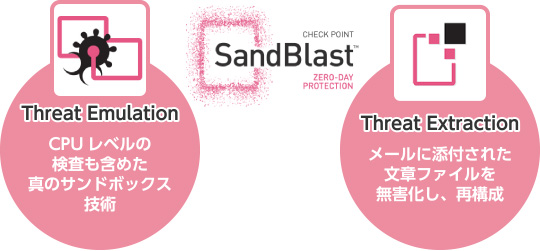
In addition to conventional OS-level emulation, SandBlast uses a unique technique to detect exploits at the CPU level. For example, an OS-level sandbox can only detect a threat after malicious code has already executed. With CPU-level sandboxing, SandBlast detects the exploit itself, allowing it to block the attack before the malicious payload runs. - Threat Extraction – Content Disarm and Reconstruction
Threat Extraction sanitizes malicious files. It removes potential threats embedded in files and reconstructs a safe version that is then delivered to the user. This enables end users to open attachments without worrying about malware infections.
Features of SandBlast TE Appliances
-
Proactive protection against unknown malware and zero-day threats
Unlike other solutions, SandBlast inspects not only at the OS level but also at the CPU level, using proprietary technology.
Because it can block attacks before they fully execute, it avoids the usual trade-offs between speed, coverage, and accuracy that often become bottlenecks in threat prevention. This means you can keep SandBlast in full prevention mode without disrupting business operations.
The SandBlast Threat Emulation engine monitors CPU-level instruction flows and detects attempts to bypass OS or hardware security mechanisms. It identifies threats that seek to execute malicious code and stops them before they can evade sandbox detection.
Newly detected threat intelligence is sent to the ThreatCloud™ (*) database. This allows other Check Point gateways to be updated and protected, preventing the further spread of the threat.*ThreatCloud is Check Point’s industry-first security infrastructure designed to stop cybercrime. It continuously distributes real-time threat intelligence collected from Check Point research teams, a global sensor network, industry intelligence feeds, and specialized vendors participating in the ThreatCloud IntelliStore marketplace.
-
Detecting unknown threats with Threat Emulation (sandbox)
Threat Emulation uses a best-in-class sandbox engine that excels in both speed and accuracy to analyze suspicious files and block attackers from infiltrating the organization’s network.
The Threat Emulation engine first inspects CPU-level instructions to detect attempts to evade OS and hardware security features. This prevents attackers from bypassing sandbox defenses.
Within the sandbox, OS-level behavior is analyzed, such as unusual registry changes, new file creation, network connections, or modifications to system processes. Files determined to be malware are blocked from entering the internal network.
With this layered defense, files containing unknown malware can be stopped before infection occurs.
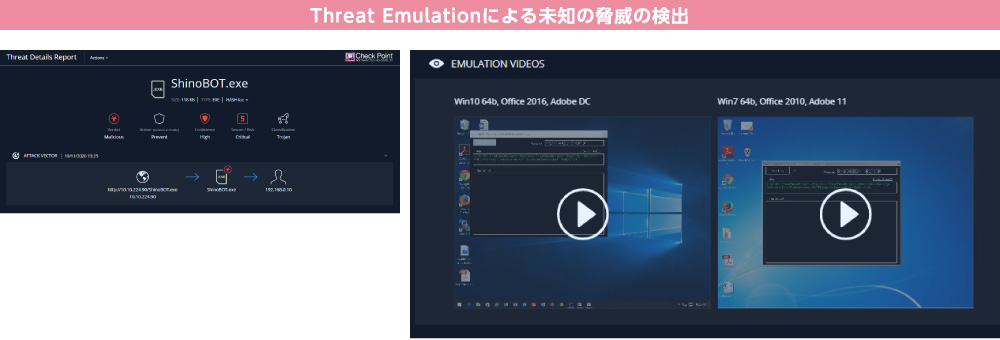
Each time a file is emulated, a detailed report can be generated. These reports are easy to understand and provide comprehensive information about any malicious activity triggered during execution, including screenshots captured while the file was running in the sandbox.
-
Delivering sanitized content with Threat Extraction (email CDR)
Threat Extraction removes high-risk elements such as macros, embedded files, and external links, then reconstructs the document using only components that have been confirmed safe. The sanitized file is then delivered to the user. Where general products often require time to detect and block threats, Check Point’s Threat Extraction follows a preventive approach, stripping out all risky elements so that safe, sanitized documents are available to users without delay.
There are two delivery options: preserving the original file format or converting the document to PDF.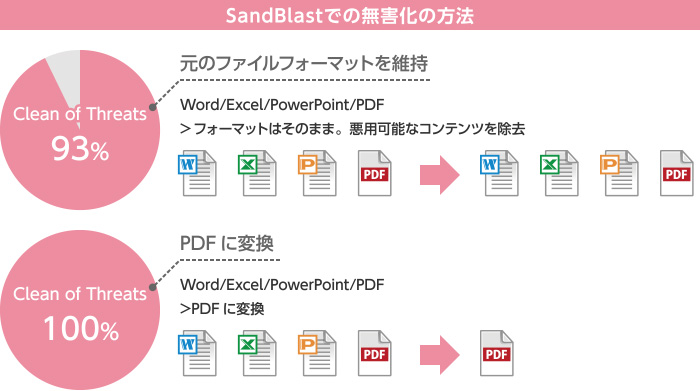
Threat Extraction deletes active content and embedded objects that may be malicious, reconstructs a file without potential threats, and forwards this sanitized content to the user with no delay. You can choose whether to immediately deliver the reconstructed document or to wait for the Threat Emulation result and then decide whether reconstruction is needed. -
Flexible Deployment Options
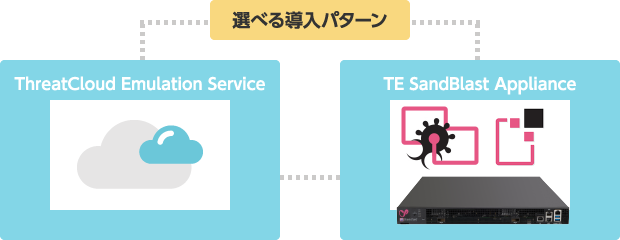
SandBlast can be deployed in a way that best fits the customer’s environment, either as a cloud service or as a dedicated appliance.
-
Cloud-Based
Can be integrated into your existing environment without the need to deploy new hardware. -
Dedicated Appliance
For customers who do not wish to send files to the cloud, a private-cloud emulation appliance can be deployed on-premises, enabling file inspection without uploading data to an external cloud.
-
Cloud-Based
Deployment Patterns
Deployment pattern 1:
Add a dedicated appliance for detection, prevention, and event analysis to existing Check Point security gateways
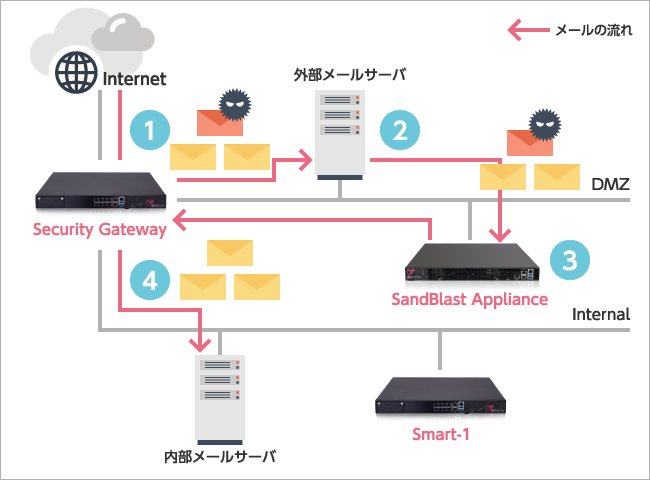
- External mail server receives email
- External mail server forwards email to SandBlast
- SandBlast performs sanitization and scanning
- Email with sanitized attachments (document files) is delivered to the internal mail server
| Check Point Security Solutions | |
|---|---|
| Email Sanitization | ✔ |
| Sandboxing (Email) | ✔ |
| Sandboxing (Web) | ✔ |
| Event Analysis | ✔ |
| Reporting | ✔ |
| Inbound Protection (IPS, etc.) | ✔ |
| Outbound Protection (anti-bot, etc.) | ✔ |
Deployment pattern 2:
Add a dedicated appliance for detection, prevention, and event analysis to an existing third-party security gateway
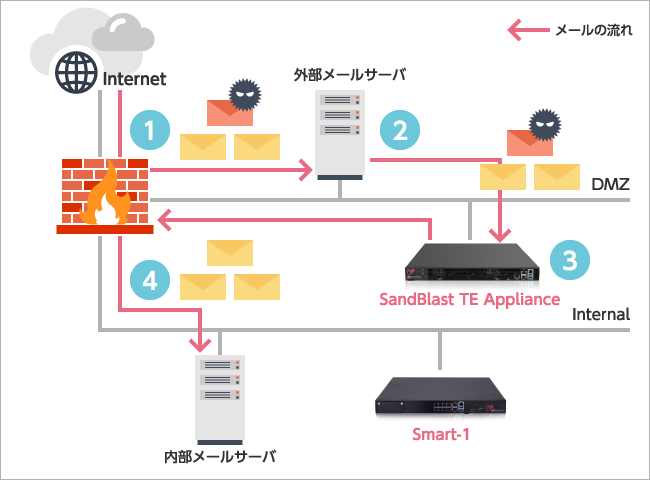
- External mail server receives email
- External mail server forwards email to SandBlast
- SandBlast performs sanitization and scanning
- Email with sanitized attachments (document files) is delivered to the internal mail server
| Check Point Security Solutions | |
|---|---|
| Email Sanitization | ✔ |
| Sandboxing (Email) | ✔ |
| Sandboxing (Web) | − |
| Event Analysis | ✔ |
| Reporting | ✔ |
| Inbound Protection (IPS, etc.) | − |
| Outbound Protection (anti-bot, etc.) | − |
Deployment Pattern 3:
In addition to existing third-party security gateways, detection and prevention via dedicated appliances
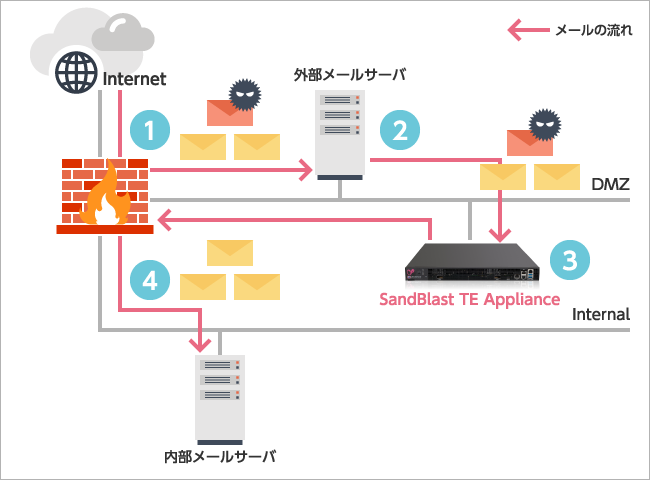
- Receive email on the external mail server
- Send from the external mail server to SandBlast
- Perform sanitization and scanning within SandBlast
- Send sanitized email with attachments (document files) to the internal mail server
| Check Point Security Solutions | |
|---|---|
| Email Sanitization | ✔ |
| Sandboxing (Email) | ✔ |
| Sandboxing (Web) | − |
| Event Analysis | − |
| Reporting | − |
| Inbound Protection (IPS, etc.) | − |
| Outbound Protection (anti-bot, etc.) | − |
Security Products
- Next-Generation Firewall
- Targeted Attack Protection
- Cloud Security / Virtualization
- Mobile / Endpoint Security
- Email Security
- Anti-Phishing
(BEC etc.) - Application Security
- Server Security
- Sandbox
- File Sanitization
- Log Analysis
- Server Monitoring
- Encryption
- Security Policy
- Industrial Control System Security
- Connected Car Security
- WAAP
- Browser Security
- Cloud Backup
- SASE
- ASM
- Vulnerability Management
- Security for AI